
Companion
The asambl Companion is the iPhone app that gives you your week on the go, mirroring the plan you build on the desktop.
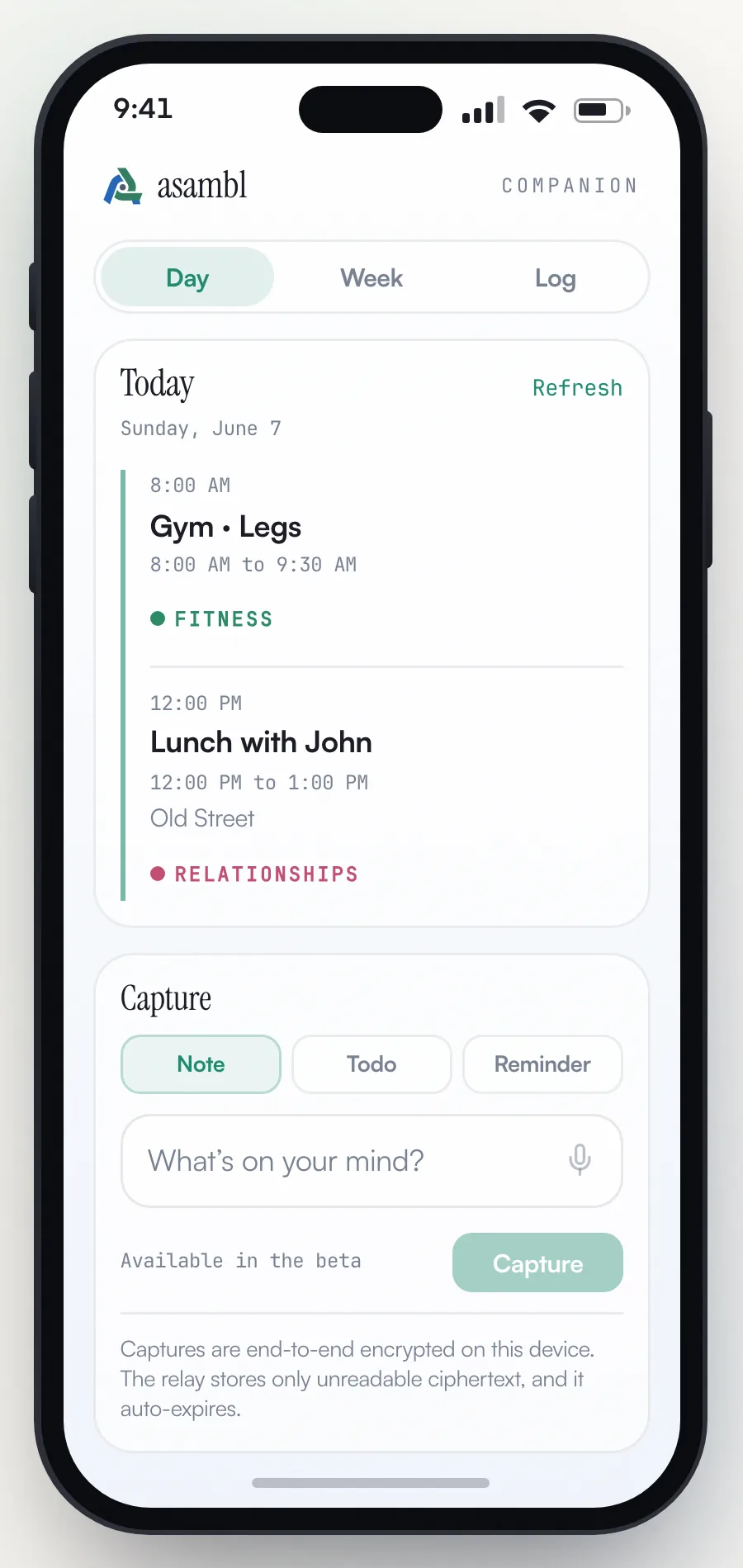
The Companion is the asambl mobile app for iPhone. It is a native iOS app that loads your asambl calendar in an in-app browser view, and the same experience is reachable at calendar.asambl.app if you want to use it from a phone browser. It gives you your week on the go and mirrors the plan you build on the desktop, so the agenda you see on your phone matches the one you assembled at your machine. It needs your desktop app running to reach your files, connecting through a secure relay so your phone and desktop stay in step.
The Companion is an iPhone app; an Android version is not available yet. It is part of asambl, included in your plan and in the free trial at no additional cost.
Pairing
You pair once, by scanning a code. On your desktop, open Settings, Integrations, switch on Capture from your phone, then choose Pair your phone: it shows a code that works once and expires after ten minutes. In the Companion, tap Scan the code and point the camera at it. The code carries your computer's key and a one-time secret, so each device checks the other's key and nothing between them can swap one in.
The code is all you need, in the iPhone app as in a phone browser.
If your phone can't scan, choose Can't scan? Type a code instead on the desktop and type the code on your phone. Scan when you can: only a scanned code carries the key check. If the phone ever says your laptop's key changed, it stops sending until you pair again: tap Pair again, then scan a fresh code.
Before you pair, the Companion already works as a pocket capture tool: notes and weigh-ins wait on the phone and send once you pair, and the iPhone app can show the phone's own calendar.
How it is organised
A bar along the bottom moves between four sections, Today, Tasks, Journal and Reminders, with the round Capture button in the middle, so getting something out of your head is one tap from anywhere. The gear at the top opens Settings, and a small line at the top says whether your desktop is active or, if it is asleep, when it was last seen.
Today carries a Day and Week toggle, with two more screens beside it:
- Ask, a question about your day, answered from what the phone can see.
- Check in, to log a workout, a meal or your weight.
Today
Day opens on the day at a glance: the date, then what comes next (the event about to start, or your top priority when nothing is imminent), how much of today's plan is done, and the day's energy plan (Plan A, B or C, as set on your desktop). Below that come the week's Top 3, today's habits, and what was recently filed from your Inbox. A yes-or-no habit has a Done button; the others are logged on the desktop.
When your committed week no longer fits, a Worth a look card shows the overloaded day and lets you drop or move an event. The change waits for you to confirm it on your desktop.
Then the agenda. Each event shows its time, and events made in asambl, rather than imported from Google Calendar, carry their life area's colour and name, with Done, Didn't and Moved so you can check in as the day goes. In the iPhone app you can show the phone's own calendar alongside.
Week lists the seven days with today first.
Check in
Check in holds three modes.
Workout logs the session your desktop has ready: record each set with reps, load and effort, rate your energy before and after, and save it back.
Food shows today's calories and macros from your desktop, and logs a meal: scan a product barcode and asambl looks it up in Open Food Facts, or describe the meal and your desktop estimates it, always labelled as an estimate.
Weight records a weigh-in. Weekly is plenty.
All three flow back to Health on your desktop, where the full meal diary, macro estimates, daily tally and training history live.
Ask
Ask answers one question at a time about your day, your plan or your training, from what the phone can see: today's events, open tasks, upcoming reminders, today's plan status and your last workout. It cannot change anything. The conversation lives only on that screen and clears when you close it, and there is a daily limit. asambl uses AI to answer and can be wrong, so double-check anything that matters.
Tasks, Journal and Reminders
The other three sections mirror the desktop side panel.
Tasks shows your list grouped by life area, in the same order as on your desktop, then anything with no area. Tick tasks off, or add one with an area and a due date in plain words, such as "call mum tomorrow".
Journal is a dated entry with an optional mood (Rough, Flat, Okay, Good or Great), added to today's journal on your desktop.
Reminders lists the coming two weeks. Mark one done, snooze it for an hour, until tonight or until tomorrow, or add a new one. Reminders fire on your desktop, and in the iPhone app with notifications on, on your phone too.
Capture
Capture is for the thought that lands while you are away from your desk, before it evaporates. From the capture sheet you can add:
- A Voice note: speak it when typing is not practical; your desktop has it transcribed and files the text in your Inbox.
- A Note: a thought, a fragment, something to keep.
- A Task: a one-line title for something to act on later, with an optional due date. Anything longer belongs in a Note.
- A Reminder: something you want surfaced at the right moment.
- A Receipt: photograph a paper receipt, and asambl reads out the shop, total and date for you to check before it is sent.
You can also send things to asambl from other apps. From Safari or Notes, use the iOS share sheet to hand a link or a snippet straight to the Companion, and it lands with your other captures.
Captures are end-to-end encrypted: your phone seals each one to your desktop before it leaves the device, and the relay that carries it only ever holds the encrypted version, never the plain text. The one exception is a receipt photo: asambl's server and Azure read the image once to pull out the numbers, and the photo is not kept; what it reads travels on encrypted like every other capture. If you are offline, captures queue on the phone and send themselves once you reconnect, so nothing is lost.
When you are next at your desktop, each capture lands where you meant it: notes, voice notes and receipts arrive in your Inbox to sort, tasks go straight onto your task list, and reminders straight into your reminders. Those are the same Tasks and Reminders the desktop side panel shows.
How it stays in sync
The Companion is deliberately read-heavy for your week and write-light for what you capture. Your desktop is the source of truth: it holds your files, builds your plan, and publishes your day, your fortnight of events, your tasks and your reminders to the phone, sealed so only your own devices can read them. If your desktop is asleep, the phone shows what it last published, and the line at the top says when your desktop was last seen.
What you add on the phone, your captures, check-ins, workouts, meals, weigh-ins, and the changes you make in Tasks, Journal and Reminders, travels back to the desktop over the encrypted relay while your desktop is running. The phone is a fast window onto your plan and an inbox for the things you catch on the go, not a separate copy you maintain.
Settings on the phone covers the link to your desktop (when it was last seen, when you paired, and unpairing), the appearance (system, light or dark) and notifications. An iPhone already signed in to an asambl account also shows the account there, to sign out or delete it.
Ask asambl
A conversational assistant built into the app that answers questions about your week, habits, goals, and life-area data, and can act on your answer once you approve it.
Settings
Every section of Settings, the extra pages you can turn on, the keyboard shortcuts, and how asambl handles your data.